KDevelop 3.5.x Features

Contents

Plugin-based architecture

  • Functionality can be added, replaced and removed without altering core source code.
  • Libraries license (LGPL) allows creating commercial and free IDE plugins.
  • Support for profiles which determine a set of plugins to be loaded. This is especially usefull for restricted environments or custom setups.

Project Management

  • Native non-intrusive automake and qmake support. Hand-made modifications allowed and recognized by the IDE, also existing projects and subprojects can be easily imported.
  • Ability to use custom makefiles to build the project.
  • Support for ant - build tool for java projects.
  • Support for extra project types like pascal, haskell, ada and scripting projects.
  • A framework for adding support for any build system by creating build system plugins for the generic project manager.
  • New file wizard to manage file templates and create new files in project from templates.
  • Can open KDevelop 2.x project files (automake based)
  • Can open KDevelop 3.x project files (any build tool supported in the 3.x versions)

Automake Manager

  • Parser which doesn't replace existing content in Makefile.am
  • support for creating multiple targets in the same subdir
  • support for setting include and linker options
  • support for create new subdirectories
  • support for creating normal and libtool-using targets
  • compiling individual targets or subdirectories
  • Compiler plugins to define compiler options in convenient dialogs.
  • supports Qt projects using automake, including rules for moc and uic
  • Configuration profiles with the ability to specify different compilers, compiler flags, build directories, target architecture, etc.
  • Internationalization support, allowing translators to add their target language to a project easily, including support of KBabel.

QMake Manager

  • Parser which doesn't replace the project file contents
  • Parses and displays the Qt4 buildsystem properly
  • Scopes
    • Display Scopes as tree nodes in the Overview
    • Add/Remove all types of Scopes (simple, Function and Include's)
    • Excluding files inside a scope is much easier
    • Support for disabling subprojects inside scopes, including proper display in the GUI
  • File Handling
    • Support of relative filenames
    • Support for file paths containing variables
  • Supports Subproject that are outside of the top-project dir
  • Support for all documented and a couple of undocumented QMake Features
    • Supports SUBDIRS = somename, somename.subdir = the_real_dir
    • Supports SUBDIRS = somefile.pro
  • New and Fixed Build options
    • Run qmake recursively
    • Dist-Clean
    • Build File

Custom Makefile

  • Supports running make with various options or a custom buildtool
  • possibility to add/remove files and directories to/from the project
  • support for defining wildcard rules for files that should be part of the project
  • support for blacklisting files and directories so they are never recognized as belonging to the project
  • out-of-the-box support for various different file types, like java, C++, Qt .ui files

Language Support

  • 15 supported languages including Ada, C, C++, Objective-C (via C support), SQL, Fortran, Haskell, Java, PHP, Pascal, Perl, Python, Ruby, Bash, XUL (unofficially).
  • Problem reporter which reports various "problems" with the source code as you type. Problems include language syntax errors, TODO's and FIXME's.
  • Class browser to display a hierarchy of classes and other symbols in project.
    • Add function-name-highlighting to the class-view and navigator
    • Make the navigator provide an own KCompletion so it is possible to write function-names without scope and get them completed
    • Restore ClassView state after refresh. The ClassView will now no longer close after each successful build
  • Language parsers to feed class browser and problem reporter.
  • Class, method and attribute wizards for object-oriented languages.
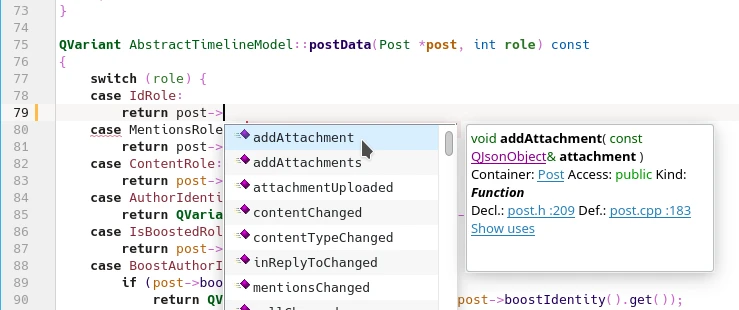
  • Automatic code completion and code hinting for class variables, methods, function arguments and more.
  • Source formatting, syntax highlighting and code folding.
  • C++ specific features, such as
    • "make member" - creating method definition in source file basing on the method declaration in header file;
    • "extract interface"- extracting interface (method declarations) and creating abstract base class with that interface;
    • "subclassing" - automated subclass creating and slot implementing for Qt Designer forms.

C++ Support

  • switch header/implementation
    • works inside the single file
    • works correctly with methods with typedef'ed return values
    • works with constant functions
    • aware of using directives when locating the functions from the namespace
  • Persistant Class Store (Code Completion databases)
    • KDE class importer correctly finds kdelibs location
    • Qt4 class importer added
    • autodetected paths now overrideable
  • code hinting
    • status bar shows the type of the expression under the cursor
  • c++ parser
    • Modify the parser to extract comments from the code, attach them to corresponding items, and store them into the AST
    • Fix a case where the cpp parser suddenly ate all RAM when facing macro-heavy files
  • code model
    • make the code-model and repository store more information like templates and comments, and provide them.
    • the code-model now completely works with nested classes that are forward-declared in one file, and completely declared in another(file-groups are managed now, and code-model-items that are physically from one file, can now be attached to another, so some search-functions had to be improved).
  • code completion
    • is much more reliable
    • was rewritten in big parts
    • works within template-classes
    • works within functions of classes that are imported by using-directives
    • can parse much more complex expressions and can easily be extended to understand additional operators(using an abstract operator-class)
    • supports class-templates, function-templates, and even implicit template-instantiation for function-templates
    • evaluates all types in the completion-entry-list and shows their template-processed(real) types
    • calltips and the completion-list show the corresponding comments
    • the completion-entry-list now shows the members sorted by their access-rights, and shows a note behind members that are protected/private
    • Fixes the bug of KDevelop crashing while completing a class which has itself as base-class and a few other little bugs
  • new context-menus that evaluate the expression under the cursor and allow to browse the code and the code-model using all types and variables involved
  • new class wizard
    • bug fixes
    • creation of headers only
  • support for QT4, different code is generated for Qt3.x and Qt4.x projects
    • Specify Qt installation dir upon project creation
    • Properly open the right designer for .ui files
    • Call the right qmake in qmake projects
    • Use Qt4 style includes
    • New Options for Qt4's QT variable in the project configuration
    • Handle Qt4 resource files in QMake Manager
  • Added new tab in the C++ options dialog to configure the used Qt library. You can configure if Qt is used, which major version and where the Qt library is installed.

Ruby Support

  • Language Features
    • Module, class and function list
    • Quickopen for modules, classes, functions (including those defined as and files
    • List of functions in the toolbar, also shows current function in the editor
  • Debugger
    • Ruby debugger with method inspection
    • Method inspection for QtRuby/Korundum bindings (including core Qt classes)
  • Unit Testing Features
    • Run test suite
    • Run test function currently opened in the editor
  • Rails
    • Rails application template
    • Run Webrick/Mongrel
  • Infrastructure
    • irb or script/console in the toolview in addition to konsole
    • QtDesigner/rbuic integration
    • documentation links to Rails/QtRuby docs
  • Ruby projects
    • Opens projects with cyclic symbolic links in the filesystem
    • Reload project function
    • App templates for normal projects, QtRuby/Korundum ones - KDE application framework, KConfig XT, DCOP server and Qt only apps

PHP Support

  • PHP Parser / code competition

Integrated Debugger

  • GDB and Java debugger frontends.
  • Integrated GDB console.
  • Line, address, method breakpoints and watchpoints.
  • Conditional breakpoints.
  • Disassembler and frame stack viewer.
  • Variable watch tree.
  • Memory, registers and libraries viewers.
  • Debugger shell (libtool) support.
  • Remote debugging.
  • Brand-new memory viewer
    • Project is automatically rebuilt with starting debugger
    • Variables widget
      • Reliably work in presence of shadowed variables
      • New "format" menu, supporting extra "binary" and "character" formats, with keyboard shortcuts for each format.
      • Keyboard shortcut for deleting watches.
    • Stack widget
      • The content is now split in columns
      • Stack frames are fetched incrementally, allowing to debug programs stuck in infinite recursion.
    • Breakpoints improvements
      • Breakpoint types renamed for clarity
      • Watchpoints are now always set on address, not expression
      • On watchpoint hit, a message box is shown
      • Breakpoint conditions are correctly reloaded from session file
      • Breakpoints added manually are shown in breakpoint list too
      • Address breakpoints now work
    • GDB output window allows to filter out "internal" commands.
    • Face lift for "attach" dialog. Now it has search line.
    • Fixes
      • Never disable the "Interrupt" action
      • Specify gdb location using full executable name, not just directory
    • Uses GDB MI interface for faster and more robust operation.
  • Debugger breakpoints window made easier to use
  • Automatically show variables window when application stops, and hide when application terminates.
  • Implement editing expression/variable values in variables window.
  • Improved the variables view

Code Editing

  • Any editor which implements KDE KTextEditor interface can be used with KDevelop.
  • Currently available editor is Kate
  • Project wide bookmarks which are stored in the project file.
  • Difference viewer between currently edited text and text on the disk.
  • Difference viewer for patch files.
  • Grep integration - regular expression search in project.
  • Project wide find and replace tool.

Version Control System

  • A common API to include VCS support in KDevelop.
  • Supported VCS systems: CVS, Perforce, Subversion and Clearcase.
  • GUI support via context menu on files and directories of the project and also directly in the editor
  • VCS status coloring in the project tree view
  • creation of projects directly in the repository

Subversion

  • supports common operations such as add/remove files, commit and update
  • support log viewing
  • supports difference viewing between working copy and Base or Head
  • support for annotate, copy, switch and merging

Application Wizard (project templates)

  • Application wizard generates complete, ready-to-go sample applications.
  • Templates for each supported language and build system.
  • Ability to use custom application templates not included in the distribution.
  • A bunch of KDE related project templates (KPart applications, simple KDE applications, KControl modules, Kicker (panel) applets, KOffice parts, KIOSlaves, Konqueror, Noatun and Kate plugins and desktop styles), GTK, GNOME and Bonobo application templates
  • Uses utf8 for created files - no encoding problems anymore

Documentation Viewer

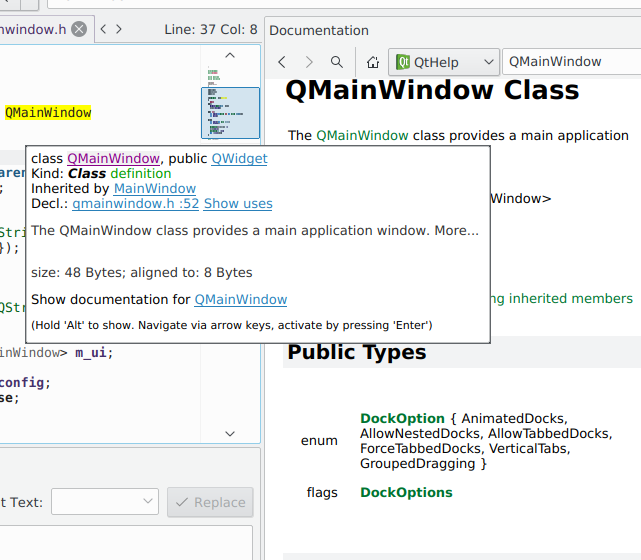
  • A unified interface to browsing documentation.
  • TOC, index and full text search (with htdig) capabilities.
  • Autodetection and inclusion of Qt, KDE Libs and DevHelp documentation.
  • Support for custom documentation collections (KDevelopTOC format).
  • Ability to open local, remote and even compressed documentation (using any protocol supported by Konqueror - http, ftp, sftp, tar, zip, etc.).
  • Can use any documentation format that your KDE supports

Code Snippets

  • SnippetPart adds a tool-view which by default docks to the right
  • Adding, editing and removing of snippets is available via a popup-menu
  • Double-clicking a snippet form the list inserts it into to the active view at the current cursor position
  • Tool tips show the content of a snippet
  • Snippets are stored in the users home-directory, so every user can have his own snippets
  • Snippets can contain variables in the style of $VARNAME$. On using the snippet the user is prompted to enter replacement value for the variables

Doxygen integration (API documentation generator)

  • Supports all programming languages that doxygen does (except IDL and D)
  • Previews the documentation that doxygen generates for the file you're currently editing
  • Configures doxygen
  • Runs doxygen
  • Views doxygen generated docs (html man or pdf formats)
  • Can use doxygen's generated XML as tooltips for "as you type" code completion

RAD (Rapid Application Development) tools

  • KDevDesigner integration enables GUI design from within KDevelop itself
  • KDevAssistent integration provides a feature rich documentation viewer from within KDevelop
  • The C++ Class Wizard can now be used for classes in the persistant class store. This means, for example, that if the Code Completion database for Qt is built then subclassing from Qt classes is possible in the wizard
  • Improved "Find in files", Ctags support and history navigation provide faster code navigation
  • More application templates are provided
  • new templates for cmake based C/C++ apps and libraries
  • new templates for scons-based kde apps
  • New generic projectmanager:
    • It's based on the kdevelop platform architecture where project management GUI is abstracted from a specific buildsystem. Buildsystems are handled using plugins ("project importers, builders and editors")
    • Workspace support is available
    • Project builders: make builder
    • Project importers: automake, custom makefiles, qmake

Ctags support

  • It is possible to have multiple tag files active at the same time, making it possible to do lightning quick searches in external sources.

UI

  • Simple IDEAl UI mode is now the default
    • It's faster and has less bugs
    • Takes less screen estate
    • The viewspace can be split, allowing KDevelop to show files side by side.
    • IntelliJ IDEA - alike toolview keyboard navigation (with <alt+1>, <alt+2>, etc.)
    • Better keyboard navigation and focusing

Code Reformatting

  • Less bugs (updated to AStyle 1.19)
  • Support for all AStyle options
  • Improved option settings dialog
  • Global and per project settings
  • Format multiple files at once


QuickOpen

  • Arbitrary parts of the scope can now be used as a filter while searching for classes or functions
  • Quick open class has an additional selection dialog for cases when more than one class with given name exist

Konsole

  • Does not syncs with the active document dir anymore

Grep (Find in Files)

  • Define more filetypes (incl. ruby) to search within
  • allow pattern to be a regular expression

Outputviews

  • Support for Intel Fortran Compiler and Portland Group's PGI Fortran compiler (pgf90/pgf95)


Valgrind integration

  • Valgrind integration to find memory leaks in programs.
  • Use the environment variables as set in the run options

Misc

  • Add toolbar and menu entry for "Goto Last Edit Position"
  • Improved support for encodings
    • KDevelop will now obey the selected encoding in the File Open dialog
    • The OpenWith plugin now offers all available encodings in "Open As"
    • The encoding for each open file is saved with the session, and will be used to open that file the next time the project is loaded
    • Default encoding can be set per project in the Project Options - this will be the default when opening a file
    • File Open encoding will default to the open project's default
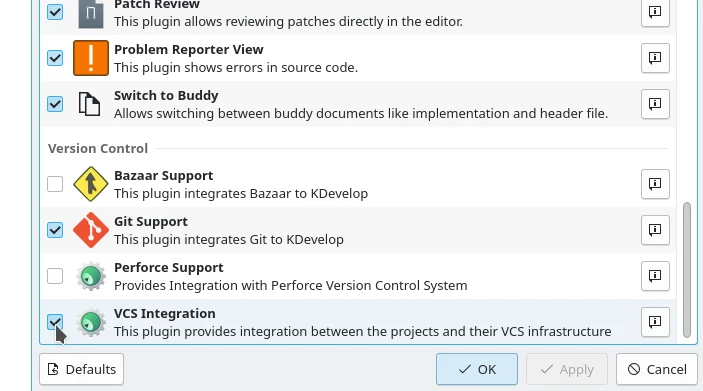
  • Moved plugin selection dialog out of project setting dialog and into main menu Settings menu and made it profile-based
  • Use profile engine to specify the default plugin set for a freshly created or imported project
  • Honor the UI Designer embedding setting
  • File selector, file tree and file groups facilities obviating the need for an external file manager.
  • The inclusion of any other program you need for development by adding it to the "Tools"-menu according to your individual needs.
  • Regular expression tester.
  • Project distribution and packaging tool for automated creation of source and binary packages.
  • Part explorer to query available KDE services.

This page was last updated on: Sun May 18 16:50:11 2008

If there are any problems with the website, please contact the webmaster.
English Arabic Czech German Spanish French Hungarian Indonesian Italian Dutch Polish Portuguese Brazilian Portuguese Romanian Russian Turkish Ukrainian Simplified Chinese
Powered by Google
www www.kdevelop.org