KDevelop 3.0.x F.A.Q. (Frequently Asked Questions)

General questions
Questions about KDevelop IDE
Compiling and building issues
Where do I get KDevelop? How do I install it?
The KDevelop Team does not release any binary versions of KDevelop (RPMs). RPMs can therefore be found on your distributor's server or in the corresponding subdirectories of ftp.kde.org or one of its mirrors
Take a look at our download site for information about how to download and compile the source code.


Am I allowed to develop commercial applications with KDevelop?
Everyone and all entities are free to use KDevelop. The generated Code can be put under all licenses you wish. Therefore, the project generator has the fields for adding your own copyright notice to the generated files, but to make things simpler and to have an example, the default is a GPL license notice. So you can add your license notice there.
When it comes to actually editing etc. your program, using KDevelop is just as using any other editor, it's a program that is GPL that is intended for use and doesn't have any implications on what you use it for. So you can write commercial/closed software with it despite the fact that KDevelop itself is GPL.
Towards using KDE functions or any other stuff of free software, you only have to watch the licensing notes on the libraries you're going to use. So for commercial development of KDE/Qt applications you only need a professional license from Trolltech. The KDE libraries itself are LGPL which means you can use the function calls and link your program to the KDE libraries. This counts for the kdelibs libraries, the kdebase libraries (konqueror and kcontrol etc.) and the koffice libraries (for creating koffice apps).
For more information, please visit KDevelop Licensing


Am I allowed to develop commercial plugins to KDevelop?
KDevelop includes a libkdeveloplgpl.so library to allow development of commercial plugins. This library includes KDevelop interfaces and utility functions released under LGPL. If you have a professional license from Trolltech you can link your code with libkdeveloplgpl and release it under any license.


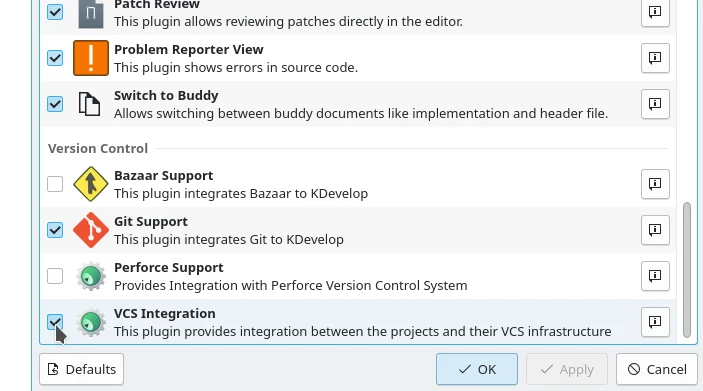
I compiled and installed KDevelop 3.0 but all I see is a File and a Help Menu
Just as any other KDE application, you have to make sure that KDevelop's plugins are recognized by KDE. Either install it into your KDE directory (configure --prefix=/opt/kde3 for example) or add KDevelop path to your KDEDIRS environment variable and rerun "kbuildsycoca". Example command line for bash (assuming KDevelop is installed in /home/harry/kdevelop):
export KDEDIRS=/home/harry/kdevelop:$KDEDIRS && kbuildsycoca


How do I switch between opened files with the keyboard?
You can use ALT-Left and ALT-Right to go to the previous/next opened file. Those keys can be configured in the KDevelop setup. There is also Quick Open (CTRL-SHIFT-O) function to select and open file in a project and Switch To (CTRL-/) function which allows to type first letters of a name of the opened file to switch to it.


How can I enter text while debugging a console application?
The GDB window allows typing your own commands.


How can I enable code completion for external libraries?
When you have any C/C++ project opened, go to menu Project->Project Settings, in Project Options dialog choose C++ Specific tab, then Code Completion tab. Push Add Persistant Class Store button and complete the New Persistant Class Store wizard. After completing the wizard, make sure that the newly created class store is checked in the list of persistant class stores at Code Completion tab.

The configure script doesn't find my Qt library.
Use the options
--with-qt-includes=path_to_your_qt_includes
and
--with-qt-libraries=path_to_your_qt_library
or set the environment variable QTDIR to the path where Qt is installed
( "export QTDIR=/path/to/qt" ).


Patching configure/Makefile/Makefile.in/config.h doesn't help, after starting autoconf/automake/autoheader my changes are lost. Where should I patch things?
There's a list of file, where you may patch things for the autotools.
Makefile.am, configure.in.in, configure.in (only if there is no configure.in.in)
[rarely used: acconfig.h, configure.in.mid, configure.in.bot]


I am developing an application where I need to set -D options to the preprocessor.
If I add these in KDevelop to my project options, everything is ok, but when I
distribute my package, the -D options set in KDevelop are not used. What do I have
to do to make this work ?

Edit the file configure.in(.in) in your toplevel source directory. Here, you
have to enter after the AC_CHECK_COMPILERS macro:
CPPFLAGS="$CPPFLAGS -DMYDEFINE"
and after that you have to recreate your new "configure" by invoking
"make -f Makefile.dist" and then rerun the configure script.


Is there another possibility to publish my own defines?
Another version to include DEFINEs in your project is to publish
them by config.h.
To do so you have to patch the following files:
Add to acconfig.h of your toplevel project directory the following line:
#undef MYDEFINE

and insert in the configure.in(.in), after the macro call
AC_CONFIG_HEADER(config.h):
AC_DEFINE_UNQUOTED(MYDEFINE)

(So it will be defined in config.h after updating your framework with
"make -f Makefile.dist; configure [your options]".

Requirements for this solutions are:
AC_CONFIG_HEADER(config.h)
inside configure.in(.in) and in the sourcecode a
#ifdef HAVE_CONFIG_H
#include <config.h>
#endif
before the other includes will be done
(normally this is already done in our project templates).

BTW: An advantage of this solution is to make MYDEFINE dependable on
certain situations (like creating an option for configure).
This needs of course writing an own macro function.


I am developing an application which needs exception handling.
How can I make it?

Edit the file configure.in(.in) in your toplevel source directory. Here, you
have to enter after the AC_CHECK_COMPILERS() macro:
CXXFLAGS="$CXXFLAGS $USE_EXCEPTIONS"
and after that you have to recreate your new "configure" by invoking
"make -f Makefile.dist" at the toplevel source directory and then restart
the configure script.


My configure.in.in hasn't any AC_CHECK_COMPILERS() call. Where should I put the
CXXFLAGS="$CXXFLAGS $USE_EXCEPTIONS"
mentioned above?

The new versions of configure.in.in has been simplified you can now add the line
after the AM_INIT_AUTOMAKE(<package-name>,<version>).


I am developing an application which needs run-time-type-info compiled within.
How can I make it?

Edit the file configure.in(.in) in your toplevel source directory. Here, you
have to enter after the AC_CHECK_COMPILERS macro:
CXXFLAGS="$CXXFLAGS $USE_RTTI"
and after that you have to recreate your new "configure" by invoking
"make -f Makefile.dist" at the toplevel source directory and then restart
the configure script.


The solutions above are nice, but I want this only for a certain subdirectory
(e.g. a static lib of my project)
How can I make it?

Edit the file Makefile.am in the desired source directory. Here, you
have to enter somewhere outside the KDevelop specific part:
KDE_CXXFLAGS=$(USE_EXCEPTIONS)
Take care this works only if your project is using am_edit.
(It works only for newer acinclude.m4 & am_edit, AFAWK they must be
younger than 12-09-1999, formerly it was known as APPEND_CXXFLAGS -
in this KDevelop release you will find the right once.)

You have to update your Makefile-framework as described above
(make -f Makefile.dist; ./configure [options]).


What is the difference between CPPFLAGS and CXXFLAGS?
CPPFLAGS is used for defines (means flags you need only for compiling)
CXXFLAGS is used for compiler switches (e.g. -frtti), which apply also
in the linking process.


I have seen some solutions like patching Makefile.am with
DEFS+=-DMYDEFINE
or
CXXFLAGS+=-fsigned-char
or
LD_FLAGS+=-L/usr/local/lib
Why don't you consider this?

There is a bug inside automake 1.4, which doesn't add flags to the already
existing one. With this command inside Makefile.am, you would delete the existing
settings of the named flag.
If you want these flags only for the project subdirectory use:
AM_CPPFLAGS=-DMYDEFINE
or
AM_CXXFLAGS=-fsigned-char
or
AM_LDFLAGS=-L/usr/local/lib

Take care, these flags are only published by automake version 1.4.

For setting one of these flags for the whole project, please patch the
configure.in(.in) in the toplevel source directory instead.


How can I guarantee that a user of my project will build it with automake
version 1.4?

Add to the AUTOMAKE_OPTIONS variable at the Makefile.am of the toplevel
source directory the string "1.4". E.g.:
AUTOMAKE_OPTIONS = foreign 1.4


I added an existing subproject to my project and it doesn't build anymore.
This can happen if builddir != topsrcdir. In this case run make distclean before
adding the subproject.


Can AM_CXXFLAGS (inside a Makefile.am) be used for flags like -frtti or
-fexceptions?

No! In these cases there is an ordering problem. The standard CXXFLAGS variable
published by acinclude.m4.in already contains a -fno-rtti (-fno_exceptions).
If you did apply it to AM_CXXFLAGS the compiler command would insert
these flags before the CXXFLAGS, e.g. here for -frtti:
gpp ... -frtti ... -fno-exceptions -fno-rtti ......
So the last flag (in this case, still -fno-rtti) will be used.
KDE_CXXFLAGS instead will be inserted after the standard CXXFLAGS, so it
would look like:
gpp ..... -fno-exceptions -fno-rtti ...... -frtti...
and voilą it works fine.

Take care: KDE_CXXFLAGS are only published by projects, which use am_edit
and acinclude.m4.


Why patching configure.in(.in) with CXXFLAGS="$USE_EXCEPTIONS $CXXFLAGS" doesn't work?
Look at the answer to the question "Can AM_CXXFLAGS (inside a Makefile.am)
be used for flags like -frtti or -fexceptions?" ;-)


I am using CXXFLAGS="$USE_EXCEPTIONS" inside configure.in(.in) and it works fine,
why should I use your solution?

If you would use your version before AC_CHECK_COMPILERS() a call like
CXXFLAGS="-pedantic" ./configure
wouldn't work correctly.
If you did use it after AC_CHECK_COMPILERS() the CXXFLAGS set in
AC_CHECK_COMPILERS() would be cleared.
(For example in a "configure --enable-debug" call CXXFLAGS would be
changed to insert also debug information to your code.)
So please use CXXFLAGS="$CXXFLAGS $USE_EXCEPTIONS" instead.


I'm using additional headers and libs for my KDE/QT project. Putting
-I/usr/include/foo in the compiler options and -L/usr/lib/foo to the
linker options won't distribute the settings into the tarball.
What do I have to do?

This is the most difficult part to do it the right way.
An easy, but not correct solution would be to add to the configure.in(.in):

all_includes="$all_includes -I/usr/include/foo"
all_libraries="$all_libraries -L/usr/lib/foo"

[the best place for that is before the lines:
AC_ARG_PROGRAM
AC_OUTPUT( ..... )
at the end of the file.]

Problems here:
- Who can guarantee that the includes would always be in
/usr/include/foo... maybe on some systems it could be in /usr/local/foo/include
(and maybe the libs would be there in /usr/local/foo/lib)??
- Maybe I haven't installed the foo-stuff so building would fail, but it would be
better if configure did already fail with a more helpful message.

So to make it right you would have to add a macro function to
configure.in(.in), which do certain tests and searches for an installed "foo".

If you want to do so, we can give you here only a hint... try to
understand the acinclude.m4.in or create a KDE-normal-ogl project,
there you find a file called qgl.m4, which will be concatenated to
acinclude.m4 (see "Makefile.dist"). This shows you an extensive example
to search for QT-OpenGL-Lib, you have to rewrite it for your problem.

Maybe you have luck and find already a solution for your problem inside
acinclude.m4.in, so you could use an already created function.


In the questions above I always see "configure.in(.in)". I have both files in my
project. Which file should be patched?

If there is a configure.in.in in your top-level project directory patch this one.
If you didn't find a configure.in.in patch configure.in.


Is there any HOWTO available on how to work with QT designer made dialogs ?
Yes, there is a great tutorial on http://women.kde.org/articles/tutorials/kdevelop3/index.html


I have installed htdig but there is now htsearch available ?
On e.g. RedHat systems the htsearch executable is placed in the /cgi-bin dir of apache.
You can create symlinks in /usr/bin or simply add this path ro ~/.bashrc


I have htdig, htmerge and htsearch available but I get an error message that the config file of htdig could not be found or is invalid ?
Read README.htdig in the source directory tree and create a htdig.conf file. Then copy
it to $KDEDIR/share/apps/kdevelop/tools. Now create your search index with the kdevelop
setup menu.


This page was last updated on: Sat Aug 20 21:40:19 2005

If there are any problems with the website, please contact the webmaster.
English Arabic Czech German Spanish French Hungarian Indonesian Italian Dutch Polish Portuguese Brazilian Portuguese Romanian Russian Turkish Ukrainian Simplified Chinese
Powered by Google
www www.kdevelop.org